> ## Documentation Index
> Fetch the complete documentation index at: https://docs.alleslabs.com/llms.txt
> Use this file to discover all available pages before exploring further.
# Code Details
> A comprehensive overview for developers to monitor and interact with their smart contract code within the Celatone environment.
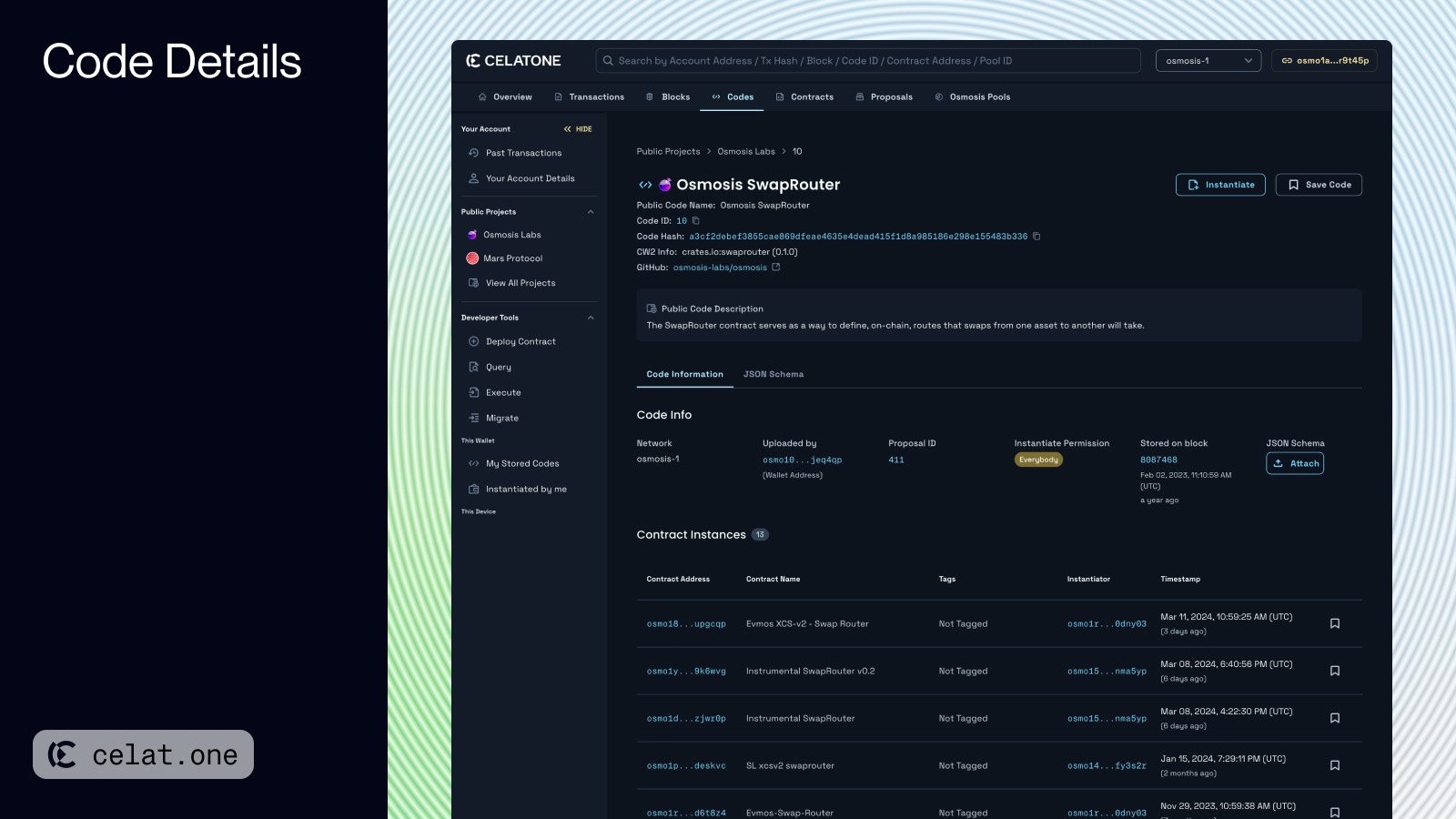 ## Top Section
This area of the Code Details page provides essential information about a specific piece of code, including:
* **Code ID**: A unique identifier for the code.
* **Code Hash**: A cryptographic hash that uniquely identifies the code.
* **CW2 Info**: Information related to the CosmWasm versioning standard.
* **Instantiate**: You can instantiate a contract from the code you're viewing, provided the instantiate button is enabled. This availability depends on the specific instantiation permissions defined for the code.
* **Save Code:** You can save code for later use. See more in [Organize Code through Celatone](https://docs.alleslabs.com/developers/cosmwasm/codes/organize)
## Code Information Section
This section includes critical data about the code:
* **Network**: Indicates the blockchain network where the code is deployed.
* **Uploaded by**: Shows the address of the entity that stored the code.
* Code Origin: Each code can be stored in three ways
* **Instantiate Permission**: Informs whether the code can be instantiated freely by anybody or by permission only. Hovering the chip give you the information of the displaying permission.
* **Stored on block**: Specifies the blockchain block number and date when the code was stored.
* **JSON Schema**: An option to attach a JSON schema to the code for clarity on input fields and data types. See [Attach JSON Schema](https://docs.alleslabs.com/developers/cosmwasm/codes/attach-json-schema)
## Contract Instances
Below the code information, you'll find a list of contract instances that have been created from this code. Each entry provides the contract's address, name, tag, initiator, and timestamp.
## JSON Schema
The JSON Schema section of the Code Details page on Celatone is dedicated to enhancing your understanding and interaction with the smart contract code.
See full information about using JSON Schema through Celatone
## Top Section
This area of the Code Details page provides essential information about a specific piece of code, including:
* **Code ID**: A unique identifier for the code.
* **Code Hash**: A cryptographic hash that uniquely identifies the code.
* **CW2 Info**: Information related to the CosmWasm versioning standard.
* **Instantiate**: You can instantiate a contract from the code you're viewing, provided the instantiate button is enabled. This availability depends on the specific instantiation permissions defined for the code.
* **Save Code:** You can save code for later use. See more in [Organize Code through Celatone](https://docs.alleslabs.com/developers/cosmwasm/codes/organize)
## Code Information Section
This section includes critical data about the code:
* **Network**: Indicates the blockchain network where the code is deployed.
* **Uploaded by**: Shows the address of the entity that stored the code.
* Code Origin: Each code can be stored in three ways
* **Instantiate Permission**: Informs whether the code can be instantiated freely by anybody or by permission only. Hovering the chip give you the information of the displaying permission.
* **Stored on block**: Specifies the blockchain block number and date when the code was stored.
* **JSON Schema**: An option to attach a JSON schema to the code for clarity on input fields and data types. See [Attach JSON Schema](https://docs.alleslabs.com/developers/cosmwasm/codes/attach-json-schema)
## Contract Instances
Below the code information, you'll find a list of contract instances that have been created from this code. Each entry provides the contract's address, name, tag, initiator, and timestamp.
## JSON Schema
The JSON Schema section of the Code Details page on Celatone is dedicated to enhancing your understanding and interaction with the smart contract code.
See full information about using JSON Schema through Celatone