> ## Documentation Index
> Fetch the complete documentation index at: https://docs.alleslabs.com/llms.txt
> Use this file to discover all available pages before exploring further.
# Module Details
The **"Module Details"** page in Celatone provides comprehensive information about a specific Move module. It includes:
* **Module Name:** The top of the page lists the module’s name
* **Module Path**: A module path in Move uniquely identifies a module on the blockchain, consisting of the account address where the module is published and the module's name, formatted as **`account_address::name`**
* **Creator**: Display the account address who published the module
* **Friends**: Lists other modules explicitly declared as **"friends"** within this module, granting them access to certain functions or resources not public.
* **Call-to-action options**: Enabling users to view, execute, or copy the module's ABI with ease. Users can also republish the module if it was originally published by them.
***
## **Overview**
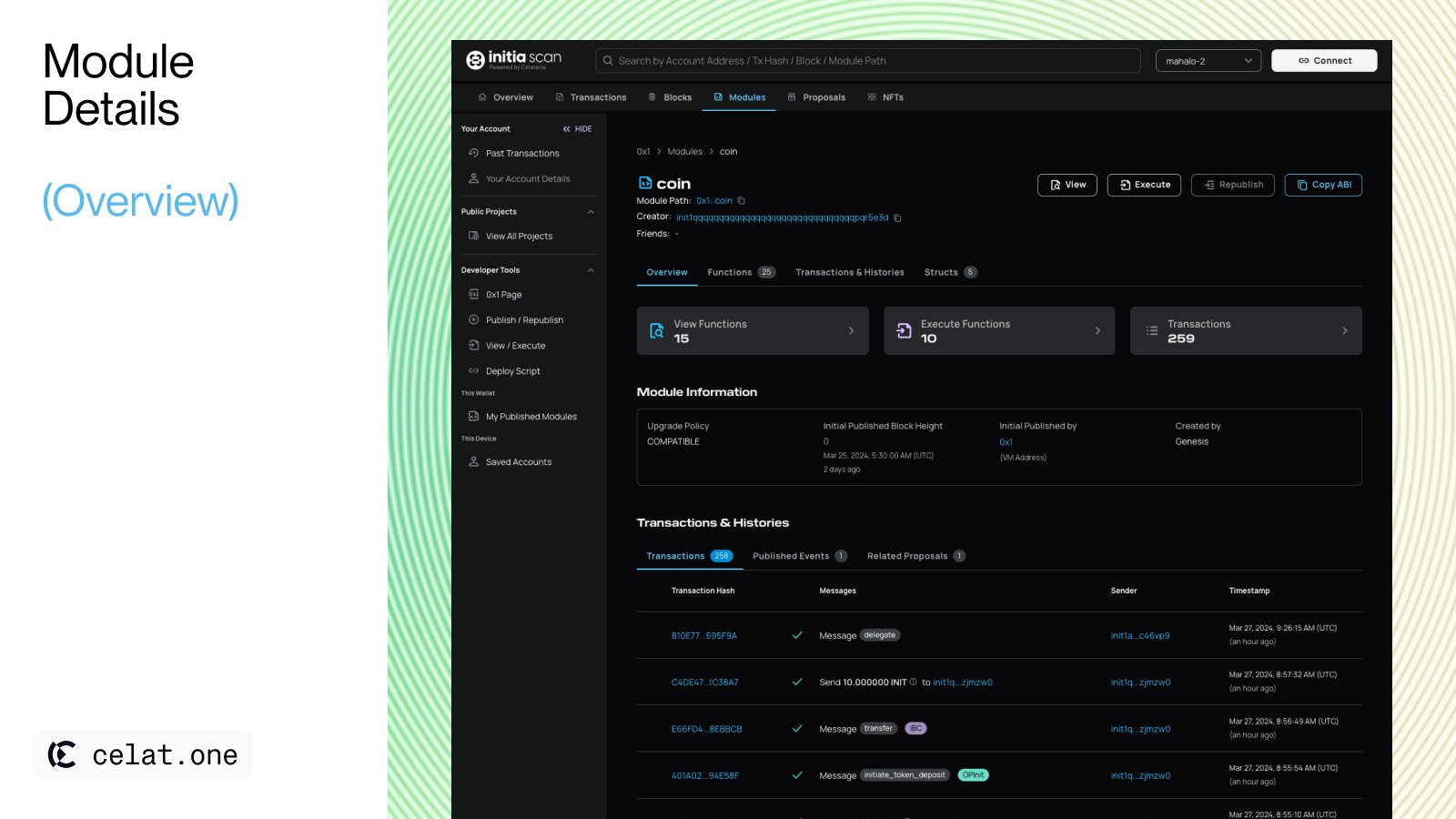 This section contain a shortcuts to see view and execute functions, module information, and transaction & histories details.
* **Shortcuts**: Enables users to quickly see the total number of view and execute functions, as well as transactions, allowing for faster access.
* **Module Information**
* **Upgrade Policy:** Describes the rules or conditions under which the module can be upgraded.
* **Initial Published Block Height:** Indicates the blockchain height at which the module was first published.
* **Initial Published by:** Shows the account address of the initial publisher.
* Depending on the module's creation context, one of the following will be displayed:
* **Created by:** For modules originating from the genesis block, this will be displayed as "Created by Genesis."
* **Initial Published Transaction:** For modules created post-genesis through normal processes, it will show the transaction details.
* **Initial Published Proposal ID:** For modules initiated through a proposal, this will the corresponding proposal ID.
* **Transactions & Histories**: A log of all transactions involving the module, including published events and related proposals. More information on [“Transaction & Histories” section](/user-guide/move/modules/detail-page#transactions-and-histories)
***
## Functions
This section contain a shortcuts to see view and execute functions, module information, and transaction & histories details.
* **Shortcuts**: Enables users to quickly see the total number of view and execute functions, as well as transactions, allowing for faster access.
* **Module Information**
* **Upgrade Policy:** Describes the rules or conditions under which the module can be upgraded.
* **Initial Published Block Height:** Indicates the blockchain height at which the module was first published.
* **Initial Published by:** Shows the account address of the initial publisher.
* Depending on the module's creation context, one of the following will be displayed:
* **Created by:** For modules originating from the genesis block, this will be displayed as "Created by Genesis."
* **Initial Published Transaction:** For modules created post-genesis through normal processes, it will show the transaction details.
* **Initial Published Proposal ID:** For modules initiated through a proposal, this will the corresponding proposal ID.
* **Transactions & Histories**: A log of all transactions involving the module, including published events and related proposals. More information on [“Transaction & Histories” section](/user-guide/move/modules/detail-page#transactions-and-histories)
***
## Functions
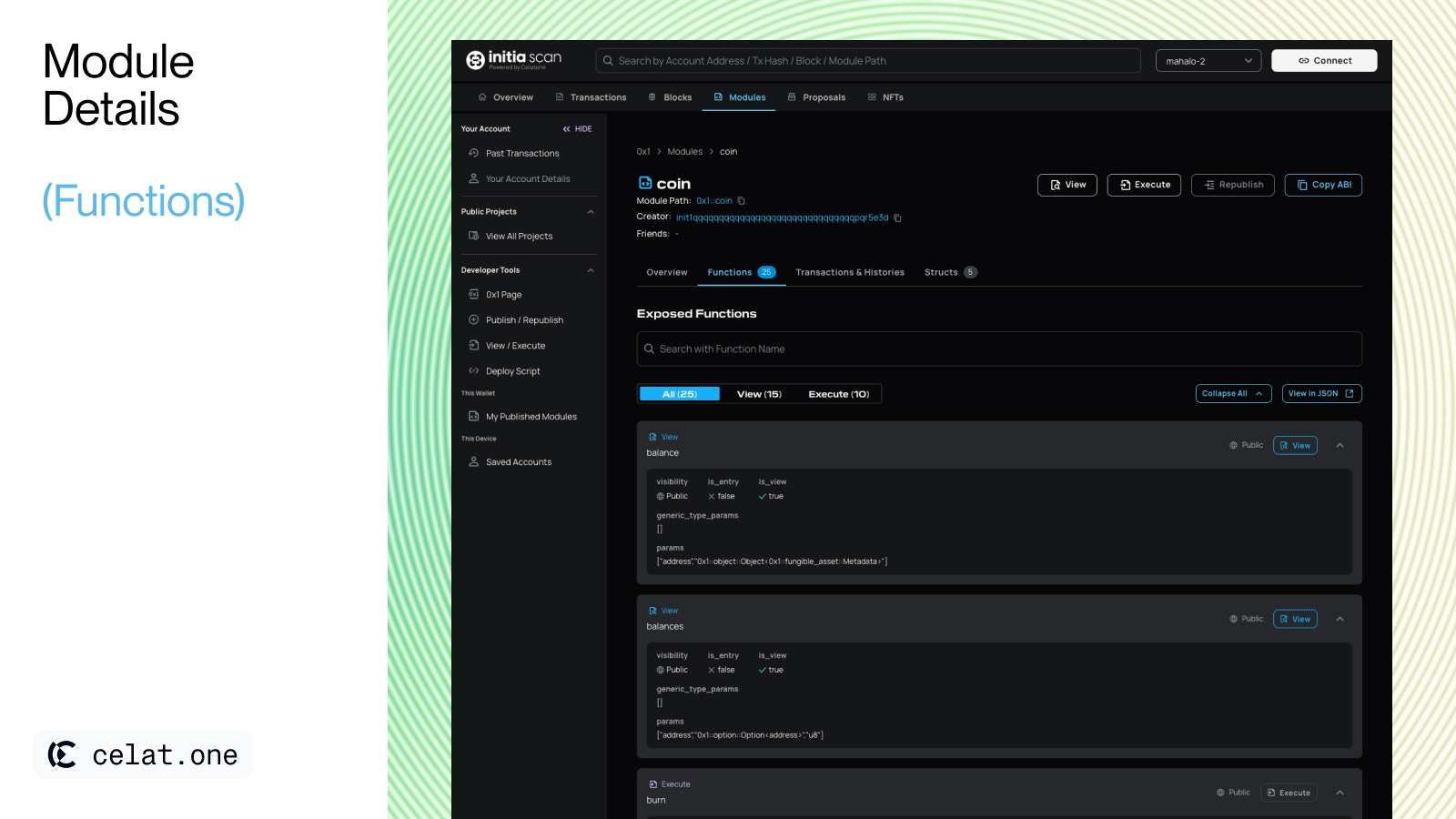 The "Exposed Functions" section in the interface provides a streamlined overview of a module's available functions, detailing:
* **Function Categories**: This filter allows users to filter through all available functions or narrow down to view only "View" or "Execute" functions, with the total count of each displayed for convenience.
* **Search Bar**: A search bar allows users to quickly find functions by name.
* **Quick Actions**: Users can expand/collapse all function details for a compact view or expand them to see full details all at once.
* **Function Details**: Each function listed under this section can be expanded to reveal specific attributes such as visibility, function's parameters and generic type parameter. Learn more about functions in [Initia Docs.](https://github.com/initia-labs/move/blob/initia-move/documentation/book/src/functions.md)
* **View in JSON**: An option for users to view the function details in JSON format, useful for developers needing a structured representation.
***
## **Transactions & Histories**
The "Exposed Functions" section in the interface provides a streamlined overview of a module's available functions, detailing:
* **Function Categories**: This filter allows users to filter through all available functions or narrow down to view only "View" or "Execute" functions, with the total count of each displayed for convenience.
* **Search Bar**: A search bar allows users to quickly find functions by name.
* **Quick Actions**: Users can expand/collapse all function details for a compact view or expand them to see full details all at once.
* **Function Details**: Each function listed under this section can be expanded to reveal specific attributes such as visibility, function's parameters and generic type parameter. Learn more about functions in [Initia Docs.](https://github.com/initia-labs/move/blob/initia-move/documentation/book/src/functions.md)
* **View in JSON**: An option for users to view the function details in JSON format, useful for developers needing a structured representation.
***
## **Transactions & Histories**
 ### **Transactions**
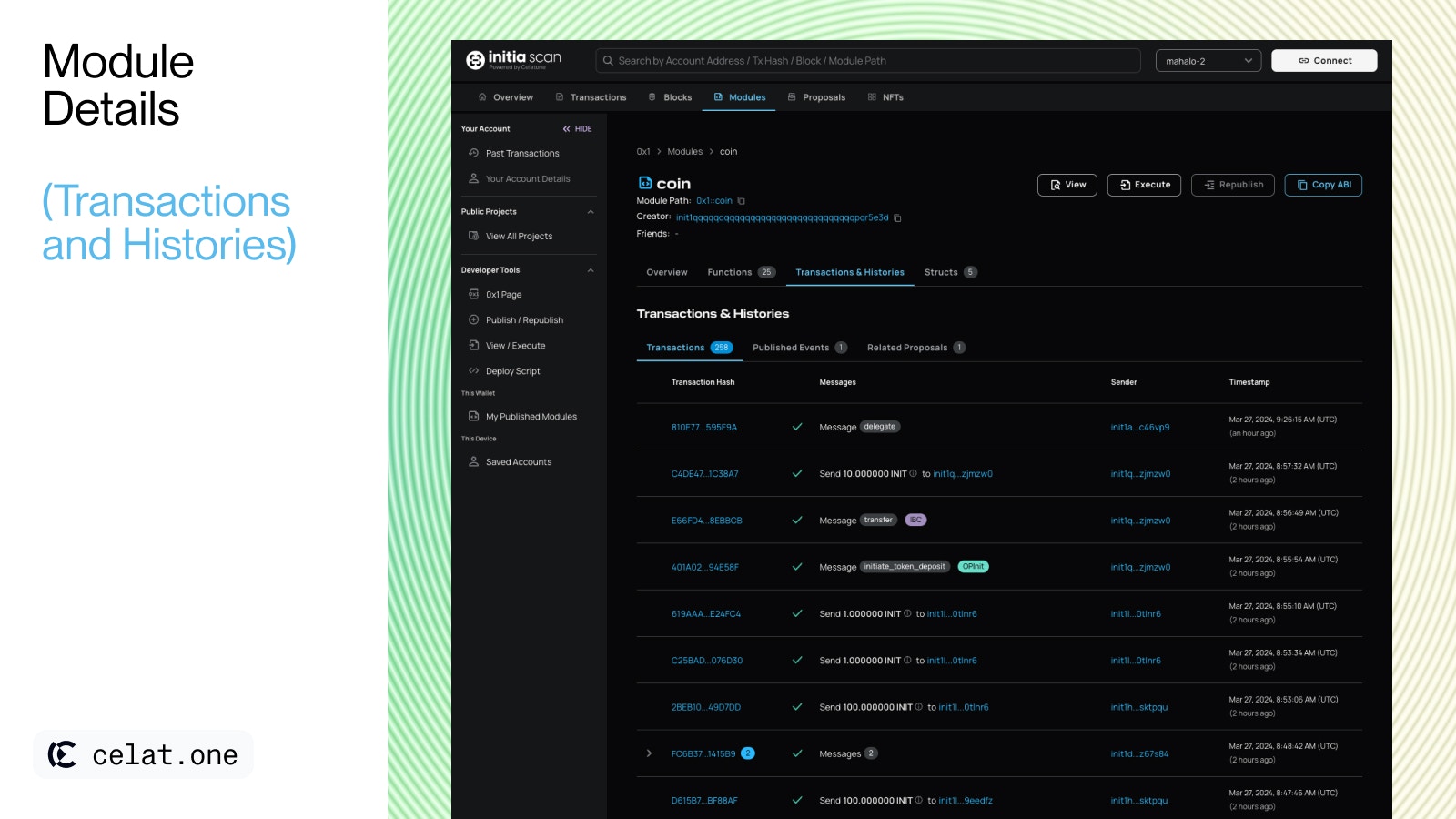
The "Transactions" details all the transactions **related** to the module. Users can view:
* **Transaction Hash**: Unique identifiers for each transaction.
* **Messages**: Descriptions of the transaction purpose, such as module publishing or policy upgrades
* **Sender**: The wallet that initiated the transaction.
* **Timestamp**: Exact date and time when the transaction was confirmed on the blockchain.
### **Published Events**
This section tracks the history and significant events related to the module, allowing users to observe:
* **Remarks**: Provides context on events, like transaction hash or proposal ID
* **Published Events**: Lists important occurrences, like changes to the module’s upgrade policy.
* **Block Height**: The blockchain height at which the event took place.
* **Timestamp**: Exact date and time when the event was confirmed on the blockchain.
### **Related Proposals**
If the module was initiated by a proposal, has undergone updates via governance, or is referenced in any proposals, such related proposals will be listed in this section.
***
## **Structs**
### **Transactions**
The "Transactions" details all the transactions **related** to the module. Users can view:
* **Transaction Hash**: Unique identifiers for each transaction.
* **Messages**: Descriptions of the transaction purpose, such as module publishing or policy upgrades
* **Sender**: The wallet that initiated the transaction.
* **Timestamp**: Exact date and time when the transaction was confirmed on the blockchain.
### **Published Events**
This section tracks the history and significant events related to the module, allowing users to observe:
* **Remarks**: Provides context on events, like transaction hash or proposal ID
* **Published Events**: Lists important occurrences, like changes to the module’s upgrade policy.
* **Block Height**: The blockchain height at which the event took place.
* **Timestamp**: Exact date and time when the event was confirmed on the blockchain.
### **Related Proposals**
If the module was initiated by a proposal, has undergone updates via governance, or is referenced in any proposals, such related proposals will be listed in this section.
***
## **Structs**
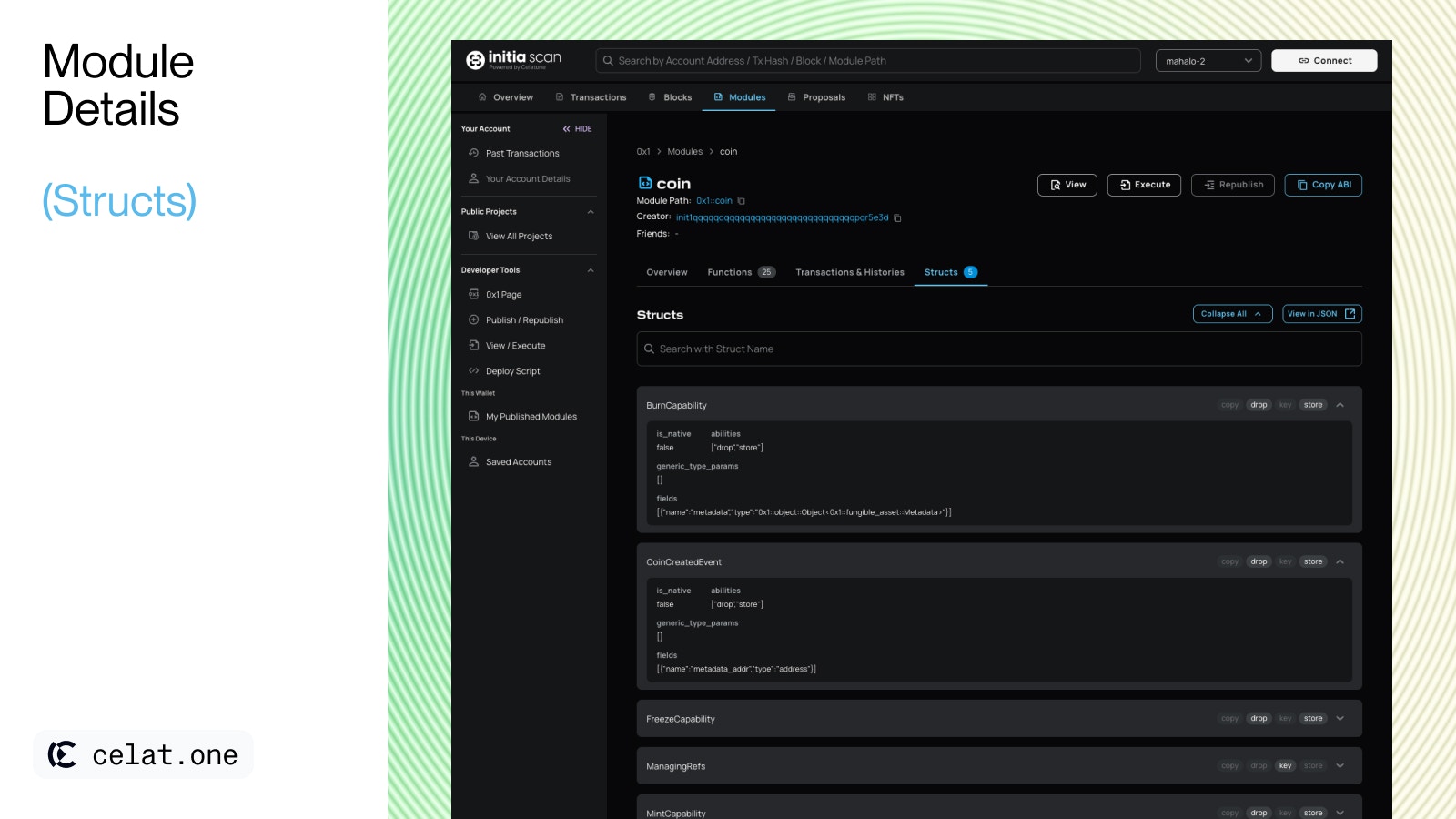 The "Structs" section offers an organized view of the data structures defined within a module:
* **Search Bar**: Users can look up structs by their names for quick access.
* **Quick Actions**: Users can expand/collapse all struct details for a compact view or expand them to see full details all at once.
* **Struct Details**: Each struct listed under this section can be expanded to reveal specific info such as abilities, fields and generic type parameter. Learn more about structs in [Initia Docs.](https://github.com/initia-labs/move/blob/initia-move/documentation/book/src/structs-and-resources.md)
* **View in JSON**: An option for users to view all structs in JSON format, useful for developers needing a structured representation.
The "Structs" section offers an organized view of the data structures defined within a module:
* **Search Bar**: Users can look up structs by their names for quick access.
* **Quick Actions**: Users can expand/collapse all struct details for a compact view or expand them to see full details all at once.
* **Struct Details**: Each struct listed under this section can be expanded to reveal specific info such as abilities, fields and generic type parameter. Learn more about structs in [Initia Docs.](https://github.com/initia-labs/move/blob/initia-move/documentation/book/src/structs-and-resources.md)
* **View in JSON**: An option for users to view all structs in JSON format, useful for developers needing a structured representation.